
How to Create a Relaxing Home Workspace for Better Focus
kytoney.pro >> Home Office>>Workspace>> How to Create a Relaxing Home Workspace for Better Focus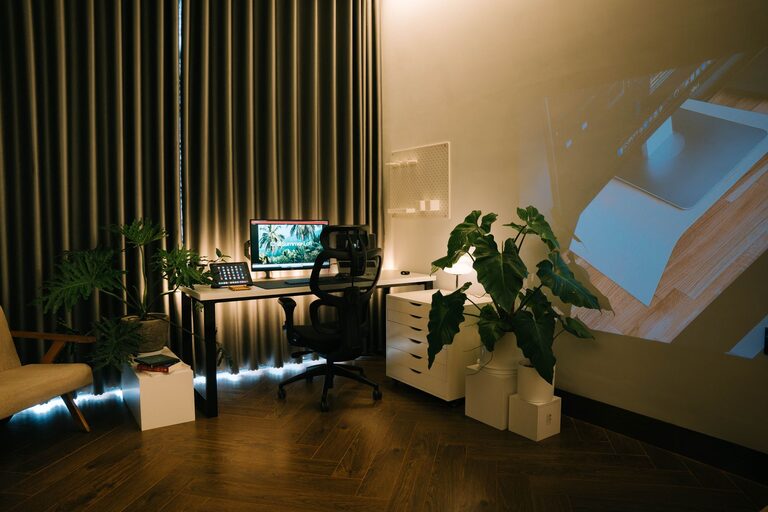
How to Create a Relaxing Home Workspace for Better Focus
Creating a relaxing home workspace is essential for staying productive and maintaining a healthy work-life balance, especially when working remotely. A well-designed area helps reduce stress, improves focus, and keeps you motivated throughout the day. In this post, we’ll explore how to transform any space into a calming and efficient home office.
Why a Relaxing Workspace Matters
Your environment plays a significant role in how you feel and perform. A cluttered or uncomfortable workspace can lead to distractions, fatigue, and stress. On the other hand, a relaxing and organized area promotes creative thinking, reduces anxiety, and boosts overall well-being.
Choosing the Right Location
Start by selecting the best spot in your home for your workspace. Ideally, pick a quiet area with natural light to create a positive atmosphere.
– Natural Light: Position your desk near a window to benefit from sunlight, which can elevate your mood and energy.
– Away from Noise: If possible, choose a room or corner that’s less exposed to household noise or distractions.
– Adequate Space: Ensure there is enough room for your desk, chair, and any other essentials without feeling cramped.
Setting Up Your Desk
Your desk is the centerpiece of your workspace. Setting it up thoughtfully can enhance comfort and productivity.
Invest in Ergonomic Furniture
– Comfortable Chair: Choose an ergonomic chair with good lumbar support to prevent back pain.
– Proper Desk Height: Ensure your desk is at a height where your arms rest comfortably with elbows at about 90 degrees.
Organize Your Desk Layout
– Keep frequently used items within easy reach.
– Use organizers or drawers to store stationery and documents.
– Maintain a clear workspace by removing unnecessary clutter daily.
Enhance the Atmosphere
A relaxing environment combines good lighting, calming colors, and personal touches.
Lighting
– Supplement natural light with soft, adjustable lamps to reduce eye strain.
– Avoid harsh overhead lighting; instead, use diffused light sources.
Colors
– Choose soothing colors for walls or accessories, such as light blues, greens, or neutrals.
– Avoid overly bright or distracting colors that can increase stress.
Personal Touches
– Add plants to introduce nature and improve air quality.
– Display artwork or inspirational quotes that motivate you.
– Use calming scents, like lavender or eucalyptus, through candles or diffusers.
Manage Noise and Distractions
Minimizing noise helps maintain concentration.
– Use noise-cancelling headphones or calming background music.
– Set boundaries with family or housemates about your work hours.
– Consider soundproofing solutions if noise is unavoidable.
Maintain Good Habits
A relaxing workspace also depends on how you use it.
– Take regular breaks to stretch and rest your eyes.
– Keep hydrated and have healthy snacks nearby.
– End each day by tidying your workspace to start fresh tomorrow.
Technology Setup
Ensure your tech setup supports productivity without adding stress.
– Use a reliable computer and internet connection.
– Keep cables organized and out of the way.
– Consider adding a second monitor for multitasking.
Conclusion
Creating a relaxing home workspace doesn’t have to be complicated. By carefully choosing your location, investing in ergonomic furniture, managing lighting and noise, and adding personal touches, you can build a space that promotes both comfort and productivity. Remember to keep your workspace organized and maintain healthy habits to enjoy the full benefits of your home office.
With these simple steps, you can look forward to a more enjoyable and focused workday right from the comfort of your home.